
Appearance
OpenFeign 详解:声明式服务调用
OpenFeign 是 Spring Cloud 中的声明式 HTTP 客户端,它让微服务之间的远程调用像调用本地方法一样简单。通过注解驱动的方式,开发者只需定义接口并标注注解,Feign 会自动生成实现类,完成 HTTP 请求的构造、发送和响应解析。
一、为什么需要 Feign?
在 Spring Cloud 体系里,Feign 并不是唯一的调用方式。在它成为主流之前,开发者通常从以下三种方案中选一个:
1)原生 HttpURLConnection,JDK 自带的底层 API,用于发送 HTTP 请求。
2)Apache HttpClient,一个功能强大的 HTTP 客户端, 与 HttpURLConnection 相比,HttpClient 提供了更多高级功能,如异步请求、重试、超时等。
3)Spring 的 RestTemplate,一个基于 HttpURLConnection 实现的 HTTP 客户端,简单易用,支持 JSON 序列化。
那么有一个问题,为什么说 Feign 代替了 RestTemplate,而不是 HttpClient 呢? 回答这个问题,我们可以从 HTTP 调用栈开始分析。
| 层次 | 名称 | 角色 | 典型代表 |
|---|---|---|---|
| 1 | 业务调用层 | 开发者写的业务代码,只想“拿到数据”,不想关心网络细节。 | Order order = orderClient.getOrder(123L); |
| 2 | 声明式/编程式 API 层 | 这一层是你提问的核心焦点。它决定了“开发者如何描述这次调用”。 | RestTemplate(编程式) vs Feign(声明式) |
| 3 | 具体 HTTP 客户端实现层 | 真正负责建立 TCP 连接、发送数据、接收响应的“发动机”。 | Apache HttpClient、OKHttp、JDK 自带的 HttpURLConnection |
| 4 | 网络传输层 | Java 标准库提供的底层网络通信能力。 | java.net.Socket |
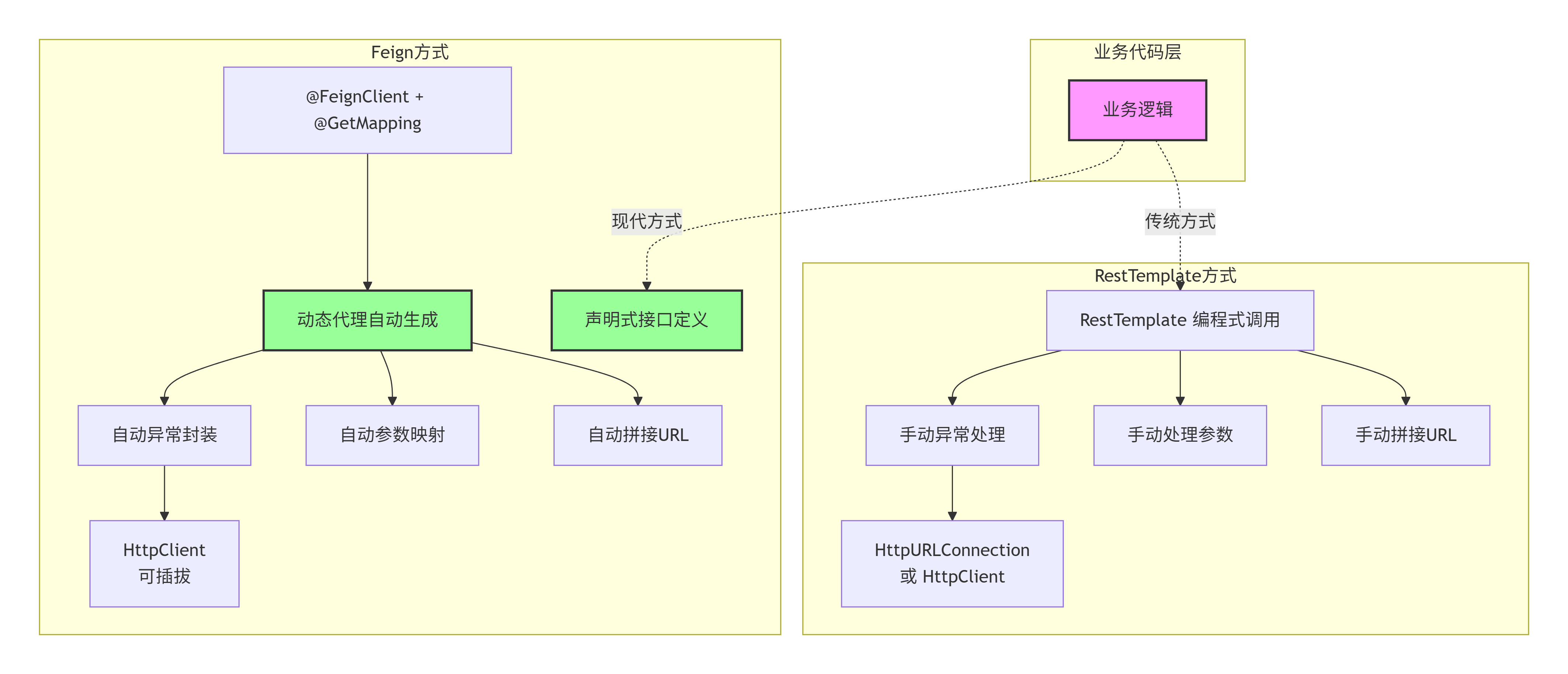
RestTemplate 和 Feign 都是“第 2 层”的选手,它们互相竞争;而 Apache HttpClient 是“第 3 层”的选手,它是给第 2 层打工的。
RestTemplate 是编程式,而Feign 是声明式 。展开讲讲
什么叫编程式?
编程式是指开发者需要手动编写代码,来描述 HTTP 请求的构造、发送和响应解析过程。例如,使用 RestTemplate 调用订单服务的接口,需要定义一个订单客户端接口,然后在业务代码中调用该接口的方法。
什么叫声明式?
声明式是指开发者通过注解驱动的方式,来描述 HTTP 请求的构造、发送和响应解析过程。例如,使用 Feign 调用订单服务的接口,需要定义一个订单客户端接口,然后在业务代码中调用该接口的方法。
举例
编程式:你打开冰箱,拿出鸡蛋、番茄,自己洗、切、起锅烧油、翻炒、放盐、装盘。你控制每一个步骤。
声明式:你对智能厨房说:“我要一盘番茄炒蛋。” 机器自动备菜、自动烹饪、自动装盘,端到你面前
区别
| 维度 | 编程式(Imperative/Programmatic) | 声明式(Declarative) |
|---|---|---|
| 核心思想 | 一步步地写算法:先做 A,再做 B,如果 C 则做 D,最后做 E。 | 只写规则/目标:告诉系统最终要什么,系统内部自动推导出执行步骤。 |
| 控制权 | 开发者控制一切:循环、条件、变量、状态切换,全部由你显式编码。 | 框架/容器控制一切:你只定义“意图”,框架负责“执行”和“调度”。 |
| 代码特征 | 充斥着 if-else、for 循环、try-catch、new 对象 | 充斥着 @注解、配置、映射、函数组合 |
| 修改成本 | 高。改一个逻辑,可能需要同时改循环、改判断、改异常处理。 | 低。改一个注解或配置,底层执行逻辑自动适配。 |
| 典型代表 | RestTemplate、JDBC、Servlet、new ArrayList<>() | Feign、Spring Data JPA(@Query)、SQL、HTML、AOP(@Transactional) |
1.4 OpenFeign vs WebClient 区别
OpenFeign 和 WebClient 都是 Spring Cloud 的 HTTP 客户端,但设计哲学完全不同。OpenFeign 是声明式,WebClient 是编程式。
代码对比:
java
// ===== OpenFeign:声明式,只定义接口 =====
@FeignClient(name = "order-service")
public interface OrderClient {
    @PostMapping("/api/orders")
    Order createOrder(@RequestBody OrderDTO dto);
}

@Autowired
private OrderClient orderClient;
Order order = orderClient.createOrder(dto);  // 像调用本地方法


// ===== WebClient:编程式,每一步自己控制 =====
@Autowired
private WebClient.Builder webClientBuilder;

Order order = webClientBuilder.build()
    .post()
    .uri("http://order-service/api/orders")
    .bodyValue(dto)
    .retrieve()
    .bodyToMono(Order.class)
    .block();
核心区别表:
| 维度 | OpenFeign | WebClient |
|---|---|---|
| 编程风格 | 声明式(接口 + 注解) | 编程式 + 函数式(链式调用) |
| IO 模型 | 阻塞 | 非阻塞(Reactor Netty) |
| 异步支持 | 需配合 CompletableFuture | 原生 Mono/Flux |
| 流式处理 | 不支持 | 原生支持 SSE |
| 代码量 | 少(只定义接口) | 中(需写构建逻辑) |
| 学习成本 | 低 | 中(需理解响应式) |
| 熔断降级 | 内置 Sentinel 支持 | 需手动集成 |
| 超时/重试 | 配置即可 | 编程式精细控制 |
如何选择:
- 微服务间同步调用 → OpenFeign(代码少,开箱即用)
- 响应式架构(WebFlux)→ WebClient(唯一选择)
- 高并发异步调用 → WebClient(非阻塞)
- 两者可以共存:同步用 Feign,异步用 WebClient
二、如何使用
核心依赖
xml
<dependency>
    <groupId>org.springframework.cloud</groupId>
    <artifactId>spring-cloud-starter-openfeign</artifactId>
</dependency>
三、工作原理
3.1. 时序图
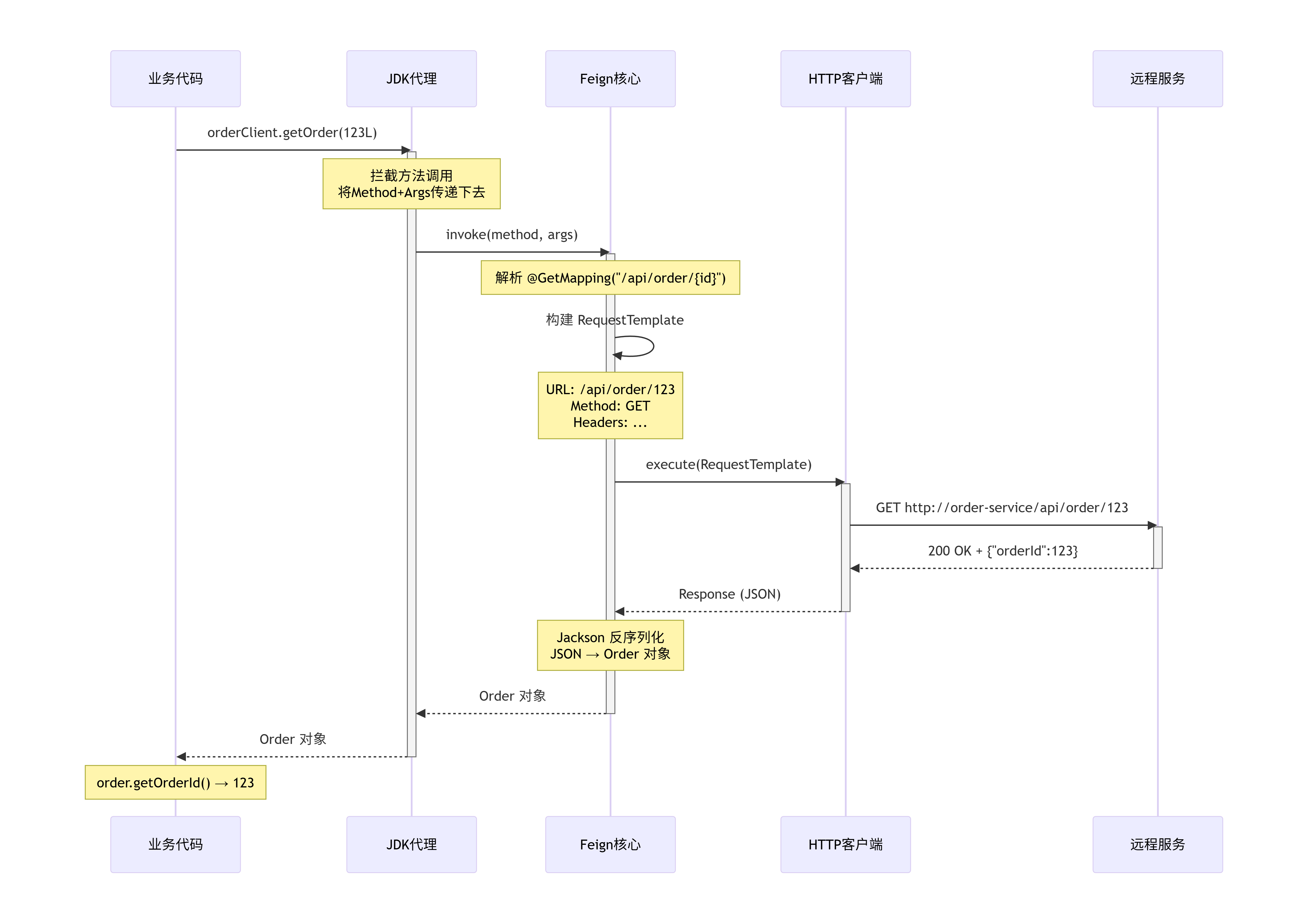
3.2. Feign 与 RestTemplate 架构对比图
3.3.Feign 核心组件关系图
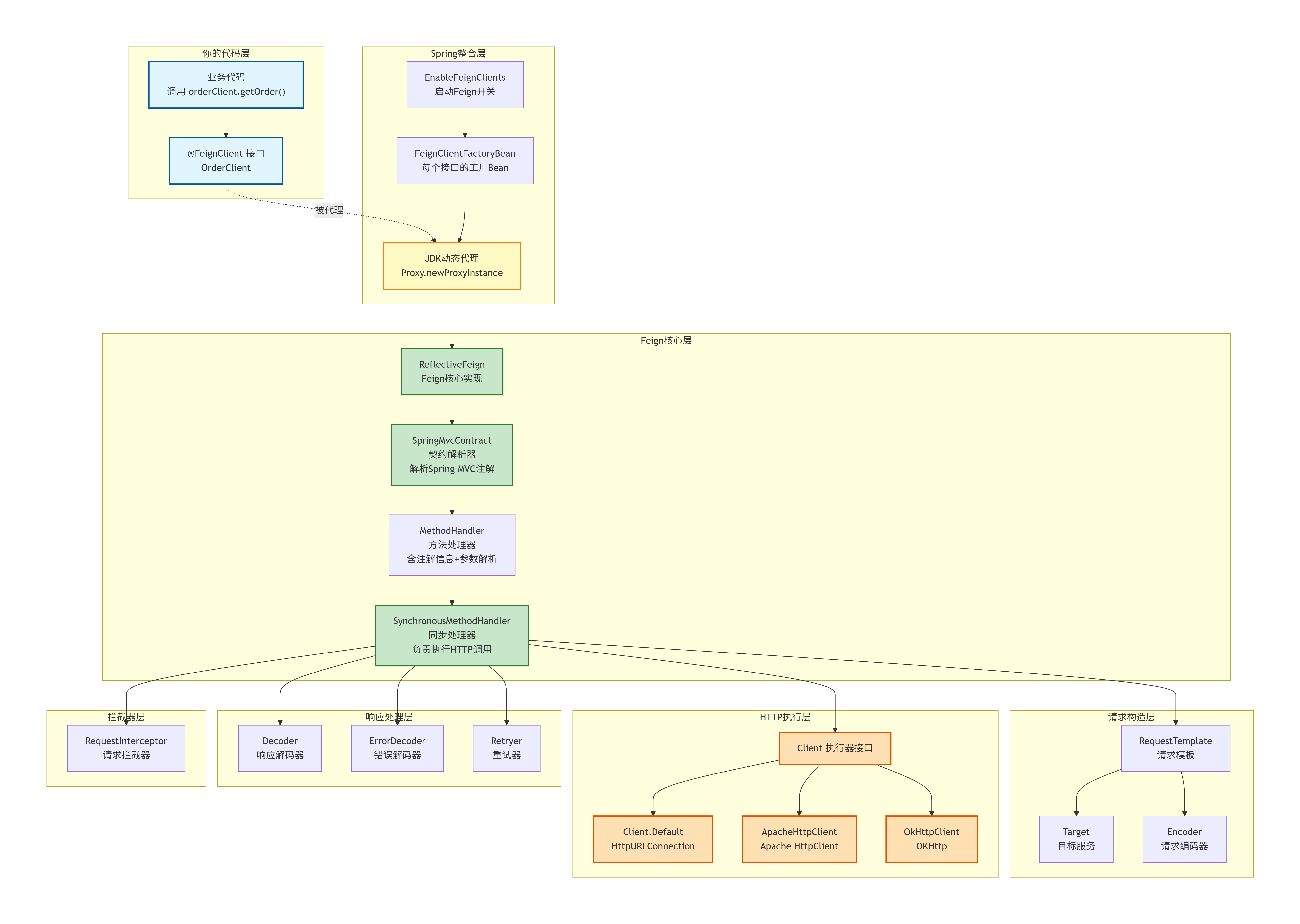
Feign 的核心就是一个动态代理工厂,它把"声明式的接口定义"在运行时转换成"真实的 HTTP 调用",通过解析注解构造请求,通过可插拔的客户端发送请求,通过解码器反序列化响应,让你在微服务间通信时,写代码就像在写本地单体应用一样简单。
四、核心配置
yaml
spring:
  cloud:
    openfeign:
      client:
        config:
          default:                    # 全局配置
            connectTimeout: 5000      # 连接超时 5s
            readTimeout: 10000        # 读取超时 10s
            loggerLevel: HEADERS      # 日志级别:NONE/BASIC/HEADERS/FULL
          order-service:              # 针对特定服务的配置
            connectTimeout: 3000
            readTimeout: 5000
      compression:
        request:
          enabled: true               # 开启请求压缩
          min-request-size: 2048      # 超过 2KB 才压缩
        response:
          enabled: true               # 开启响应压缩
      httpclient:
        enabled: true                 # 启用 Apache HttpClient
        max-connections: 200          # 最大连接数
        max-connections-per-route: 50 # 每个路由的最大连接数
五、高级特性
5.1 超时控制
为什么需要: 默认 Feign 超时时间很长(全局 60s),一旦下游服务卡死,调用方线程会一直阻塞,线程池很快打满,导致整个服务雪崩。
理解两个超时参数:
1):指的是 Feign 客户端与目标服务建立 TCP 连接的最长等待时间。这个阶段主要看网络是否通畅,服务是否在线。如果在这个时间内无法连上,就会报错。
2):指的是成功建立连接后,Feign 客户端等待服务端返回响应数据的最长时间。如果服务端业务处理过慢,或者数据量过大导致传输慢,超时就会发生。
配置方式:
1)全局配置 + 针对特定服务配置
yaml
spring:
  cloud:
    openfeign:
      client:
        config:
          default:                              # 全局默认
            connectTimeout: 3000                # 连接超时 3s
            readTimeout: 5000                   # 读取超时 5s
          inventory-service:                    # 针对特定服务
            connectTimeout: 2000
            readTimeout: 10000                  # 库存可能需要更长时间
2)可以通过代码配置
java
@Configuration
public class MyFeignConfig {
    @Bean
    public Request.Options options() {
        // 参数:连接超时(毫秒),读取超时(毫秒)
        return new Request.Options(5000, 10000);
    }
}
最佳实践: 连接超时设短(2-3s),读取超时根据业务设(查询类 5s,导出类 30s+)。不要用默认值。
5.2 错误解码与重试
为什么这两个要一起讲: 错误解码器负责把 HTTP 响应"翻译"成异常,重试机制根据异常类型决定是否重试。两者配合才能实现"该重试的重试,不该重试的快速失败"。
5.2.1 错误解码器
为什么需要: 默认 Feign 收到 4xx/5xx 响应时统一抛 FeignException,丢失了服务端返回的业务错误信息(如"库存不足"、"用户不存在")。更关键的是,调用方无法区分"暂时性故障"和"业务错误"。
java
@Configuration
public class FeignErrorDecoderConfig {
    @Bean
    public ErrorDecoder errorDecoder() {
        return (methodKey, response) -> {
            int status = response.status();
            try {
                String body = Util.toString(response.body().asReader(StandardCharsets.UTF_8));
                if (status >= 500) {
                    // 5xx:服务端故障,可重试
                    return new RetryableException(status, "服务端异常: " + body,
                        response.request().httpMethod(), null, response.request());
                }
                if (status == 404) {
                    return new NotFoundException("资源不存在: " + body);
                }
                // 其他 4xx:业务错误,不应重试
                return new BusinessException("业务错误: " + body);
            } catch (IOException e) {
                return new FeignException.ServiceUnavailable("服务不可用", response.request(), null, null);
            }
        };
    }
}
核心分类:
| HTTP 状态码 | 错误类型 | 是否可重试 | 典型场景 |
|---|---|---|---|
| 5xx (500/502/503) | 服务端故障 | 是 | 服务重启、DB 连接池满 |
| 4xx (400/404/409) | 业务错误 | 否 | 参数错误、资源不存在 |
| 连接超时 / 读取超时 | 网络异常 | 是 | 网络抖动、服务假死 |
5.2.2 重试机制
为什么需要: 网络抖动、服务短暂不可用是常态。但无脑重试会导致服务雪崩——A 调用 B 失败后重试 3 次,B 已经压力很大,3 倍流量直接压垮。
策略: 只重试幂等操作(GET、PUT、DELETE),绝不重试 POST(可能重复扣款/下单)。Feign 的 Retryer 只对 RetryableException 生效,业务异常(如 BusinessException)直接抛出,不会重试。
java
@Configuration
public class FeignRetryConfig {
    @Bean
    public Retryer feignRetryer() {
        // 初始间隔 100ms,最大间隔 1s,最多重试 3 次
        return new Retryer.Default(100, 1000, 3);
    }
}
yaml
# 配合超时,避免重试叠加阻塞
spring:
  cloud:
    openfeign:
      client:
        config:
          default:
            connectTimeout: 2000
            readTimeout: 3000
注意: Spring Cloud 2020+ 默认移除了 Ribbon 重试,Feign 自带 Retryer.NEVER_RETRY(不重试)。需要显式开启。
5.2.3 两者协作流程
调用失败 → ErrorDecoder 解析异常
  ├─ 5xx / 网络异常 → RetryableException → Retryer 重试(最多 N 次)
  └─ 4xx 业务错误 → BusinessException → 直接抛出,不重试
关键点: 错误解码器是重试的"守门员"——它决定了哪些异常进入重试通道,哪些直接失败。没有自定义 ErrorDecoder,Feign 对所有 4xx/5xx 统一处理,重试机制无法区分场景。
5.3 熔断与降级
为什么需要熔断与降级?
避免雪崩效应。想象微服务调用链 A→B→C。如果服务 C 因故障响应缓慢,服务 B 的线程会被大量占用等待 C 的响应,导致 B 也无法处理新请求,进而拖垮 A。熔断降级就是在这个链条上插入一个保险丝,当 B 调用 C 的失败率过高时,自动熔断,停止对 C 的无效等待,快速返回一个预设结果,从而保护 B 和 A 的稳定性。 重试是"再试一次",熔断是"别试了,它已经挂了"。当下游服务错误率超过阈值,熔断器直接短路,快速失败,保护调用方线程资源。
如何实现 Feign 的熔断与降级?
当前主流方案是 Sentinel(Hystrix 已停维,Resilience4j 多在非阿里系使用)。Sentinel 把熔断、降级、限流统一管理,且与 Spring Cloud Alibaba 深度集成。
5.3.1 熔断器状态机
熔断器有三种状态,自动流转:
        超时/失败次数达到阈值
  CLOSED ──────────────────────────→ OPEN
  (正常调用)                        (快速失败,不再调下游)
    ↑                                    │
    │                                    │ 等待熔断时间窗口
    │                                    ↓
    └────────────────────────── HALF-OPEN
         成功 → 关闭熔断            (放行少量请求探测)
失败 → 重新打开- CLOSED:正常状态,所有请求透传。Sentinel 统计失败比例或慢调用比例。
- OPEN:熔断状态,直接抛
BlockException(不调用下游),快速失败。 - HALF-OPEN:探测状态,放行少量请求测试下游是否恢复。成功则转 CLOSED,失败则转回 OPEN。
5.3.2 降级:fallbackFactory
熔断是"自动熔断",降级是"手动预案"——熔断或异常发生后,返回一个兜底结果,保证调用方不会拿到空数据或异常。
java
// 1. Feign 接口声明 fallbackFactory
@FeignClient(
    name = "inventory-service",
    fallbackFactory = InventoryClientFallbackFactory.class
)
public interface InventoryClient {
    @PostMapping("/api/inventory/deduct")
    Result<Boolean> deductStock(@RequestBody DeductRequest request);

    @GetMapping("/api/inventory/query/{skuId}")
    Result<Integer> queryStock(@PathVariable("skuId") Long skuId);
}

// 2. fallbackFactory 实现
@Component
public class InventoryClientFallbackFactory implements FallbackFactory<InventoryClient> {

    @Override
    public InventoryClient create(Throwable cause) {
        log.error("库存服务调用异常,触发降级", cause);

        return new InventoryClient() {
            @Override
            public Result<Boolean> deductStock(DeductRequest request) {
                // 扣减库存失败 → 记录到异步重试表,人工介入
                log.warn("扣减库存降级,订单号: {}", request.getOrderId());
                return Result.fail("库存服务暂时不可用,请稍后重试");
            }

            @Override
            public Result<Integer> queryStock(Long skuId) {
                // 查询库存失败 → 返回缓存中的最后已知值
                Integer cachedStock = redisTemplate.opsForValue().get("stock:" + skuId);
                if (cachedStock != null) {
                    return Result.ok(cachedStock);
                }
                return Result.fail("库存查询失败");
            }
        };
    }
}
fallback vs fallbackFactory:
| fallback | fallbackFactory | |
|---|---|---|
| 能否获取异常 | 否 | 是(Throwable cause) |
| 能否区分不同异常做不同降级 | 否 | 是 |
| 适用场景 | 简单兜底 | 需要日志/告警/差异化处理 |
降级策略按业务场景选择:
| 场景 | 降级策略 | 示例 |
|---|---|---|
| 查询类(读) | 返回缓存/默认值 | 库存查不到 → 返回缓存的最后值 |
| 写操作(核心) | 记录失败 + 异步补偿 | 扣库存失败 → 写入重试表,定时任务补偿 |
| 写操作(非核心) | 静默丢弃 + 日志告警 | 发通知失败 → 记录日志,不阻塞主流程 |
5.3.3 熔断规则配置(Sentinel)
Sentinel 支持三种熔断策略,按需选择:
yaml
spring:
  cloud:
    sentinel:
      transport:
        dashboard: localhost:8080      # Sentinel 控制台
      datasource:
        ds1:
          nacos:
            server-addr: localhost:8848
            data-id: inventory-sentinel
            data-type: json
            rule-type: degrade          # 熔断降级规则
或通过 Sentinel 控制台可视化配置以下几种规则:
1)慢调用比例(SLOW_REQUEST_RATIO)— 推荐用于防止慢请求拖垮线程池:
最大 RT(响应时间):200ms
比例阈值:0.5(50%)
熔断时长:10s
最小请求数:5
统计时长:1000ms

含义:1s 内至少 5 个请求,其中超过 50% 响应时间 > 200ms → 熔断 10s2)异常比例(ERROR_RATIO)— 下游大量报错时熔断:
异常比例阈值:0.5(50%)
熔断时长:10s
最小请求数:5
统计时长:1000ms

含义:1s 内至少 5 个请求,其中超过 50% 抛异常 → 熔断 10s3)异常数(ERROR_COUNT)— 分钟级异常数超过阈值直接熔断:
异常数阈值:20
熔断时长:30s
统计时长:1min

含义:1 分钟内异常数超过 20 个 → 熔断 30s
5.3.4 代码配置熔断规则(无需控制台)
java
@Component
public class SentinelDegradeConfig {

    @PostConstruct
    public void initDegradeRules() {
        List<DegradeRule> rules = new ArrayList<>();

        // 规则1:库存查询接口 — 慢调用熔断
        DegradeRule slowRule = new DegradeRule("queryStock")
                .setGrade(CircuitBreakerStrategy.SLOW_REQUEST_RATIO.getType())
                .setCount(200)          // 最大 RT 200ms
                .setSlowRatioThreshold(0.5)  // 慢调用比例 50%
                .setTimeWindow(10)      // 熔断时长 10s
                .setMinRequestAmount(5) // 最小请求数
                .setStatIntervalMs(1000); // 统计窗口 1s

        // 规则2:扣减库存接口 — 异常比例熔断
        DegradeRule errorRule = new DegradeRule("deductStock")
                .setGrade(CircuitBreakerStrategy.ERROR_RATIO.getType())
                .setCount(0.3)          // 异常比例 30%
                .setTimeWindow(15)      // 熔断时长 15s
                .setMinRequestAmount(5)
                .setStatIntervalMs(1000);

        rules.add(slowRule);
        rules.add(errorRule);
        DegradeRuleManager.loadRules(rules);
    }
}
注意: degradeRule 中的资源名(如 "queryStock")需要与 Feign 接口方法上的 @SentinelResource 注解值对应,或使用 Sentinel 自动适配 Feign 的默认资源名规则。
5.3.5 全局熔断降级 — 开启 Sentinel 对 Feign 的支持
yaml
feign:
  sentinel:
    enabled: true          # 开启 Feign 的 Sentinel 整合
开启后,所有 @FeignClient 自动被 Sentinel 保护,无需额外注解。异常时自动走 fallbackFactory。
5.3.6 最佳实践
- 降级 ≠ 吞掉异常:降级逻辑中必须打日志 + 告警,否则故障会被掩盖
- 读接口降级返回缓存,写接口降级写入重试表:写操作丢失数据比读操作影响大得多
- 熔断窗口不宜过长:建议 5-30s,太短频繁切换,太长恢复太慢
- 不同接口不同规则:核心接口用慢调用比例,非核心接口用异常比例
- 熔断 + 限流配合:用 Sentinel 对网关层限流,对服务层熔断,层层防护
5.4 请求拦截器
为什么需要: 微服务调用链路上,每个请求都需要透传 Token、TraceId、灰度标签等。不可能在每个 Feign 接口方法上手动加 header。
java
@Component
public class FeignAuthInterceptor implements RequestInterceptor {
    @Override
    public void apply(RequestTemplate template) {
        // 从当前请求上下文获取 Token
        ServletRequestAttributes attrs = (ServletRequestAttributes) RequestContextHolder.getRequestAttributes();
        if (attrs != null) {
            String token = attrs.getRequest().getHeader("Authorization");
            if (token != null) {
                template.header("Authorization", token);
            }
        }
        // 透传 TraceId 用于链路追踪
        String traceId = MDC.get("traceId");
        if (traceId != null) {
            template.header("X-Trace-Id", traceId);
        }
    }
}
典型场景: Token 透传、TraceId 链路追踪、灰度标记、用户 ID 传递。
5.5 自定义编解码器
为什么需要: 默认的 SpringEncoder / SpringDecoder 只支持 JSON。当需要 XML、Protobuf、自定义二进制协议时,需要自定义编解码器。
java
@Configuration
public class FeignCodecConfig {
    @Bean
    public Encoder feignEncoder() {
        // 自定义 XML 编码器
        return new JaxbEncoder();
    }

    @Bean
    public Decoder feignDecoder() {
        return new JaxbDecoder();
    }
}
常见场景: 对接老系统(XML)、高性能场景(Protobuf)、文件上传(SpringFormEncoder)。
5.6 更换底层 HTTP 客户端
为什么需要: Feign 默认使用 HttpURLConnection(JDK 内置),不支持连接池。每次请求新建 TCP 连接,高并发下端口耗尽、性能极差。
xml
<!-- Apache HttpClient 5(推荐) -->
<dependency>
    <groupId>io.github.openfeign</groupId>
    <artifactId>feign-hc5</artifactId>
</dependency>
yaml
spring:
  cloud:
    openfeign:
      httpclient:
        hc5:
          enabled: true
          max-connections: 200
          max-connections-per-route: 50
connection-time-to-live: 900 # 连接存活时间(秒)| 客户端 | 连接池 | 性能 | 适用场景 |
|---|---|---|---|
| HttpURLConnection | 无 | 差 | 开发测试 |
| Apache HttpClient 5 | 有 | 好 | 通用推荐 |
| OkHttp | 有 | 好 | 对 HTTP/2 有需求 |
效果: 连接池复用后,QPS 提升 5-10 倍,不再受端口耗尽困扰。
5.7 数据压缩
为什么需要: 大响应体(>1KB)场景下,Gzip 压缩可减少 60-80% 网络传输量,显著降低延迟。
yaml
spring:
  cloud:
    openfeign:
      compression:
        request:
          enabled: true
          mime-types: text/xml,application/xml,application/json
          min-request-size: 2048       # 小于 2KB 不压缩
        response:
          enabled: true
注意: 小请求不压缩,压缩本身消耗 CPU,小数据压缩反而变慢。min-request-size 阈值很关键。
5.8 日志级别
为什么需要: 出问题时能快速定位是调用方参数错了、还是服务端返回异常。生产环境按需开启,避免日志爆炸。
yaml
logging:
  level:
    com.example.client: DEBUG           # 只对特定 Feign 接口
java
@Configuration
public class FeignLogConfig {
    @Bean
    Logger.Level feignLoggerLevel() {
        return Logger.Level.FULL;       // 开发环境:打印完整请求响应
    }
}
日志级别:
| 级别 | 内容 |
|---|---|
| NONE | 不打印(生产默认) |
| BASIC | 请求方法 + URL + 响应状态码 + 耗时 |
| HEADERS | BASIC + 请求/响应头 |
| FULL | HEADERS + 请求体 + 响应体 |
生产建议: 默认 NONE,排查问题时临时改成 BASIC 或 HEADERS,FULL 会泄露敏感数据。
六、内置负载均衡
Feign 默认集成了 Spring Cloud LoadBalancer,当服务有多个实例时,自动进行负载均衡。Ribbon 的历史策略详见 Ribbon 详解,当前方案详见 LoadBalancer 详解。
七、Feign vs Dubbo vs gRPC
| 维度 | OpenFeign | Dubbo | gRPC |
|---|---|---|---|
| 协议 | HTTP/1.1 | 自定义 TCP | HTTP/2 |
| 序列化 | JSON | Hessian/Protobuf | Protobuf |
| 性能 | 一般 | 高 | 高 |
| 跨语言 | 是 | 否(Java 生态) | 是 |
| 服务治理 | 依赖 Spring Cloud | 内置丰富 | 依赖 Envoy 等 |
| 学习成本 | 低 | 中 | 中 |
| 适用场景 | 对外 API、跨语言 | Java 内部高并发 | 跨语言、高性能 |